
While working on my post about Madexx, I figured I’d make a little more fuss over NPCScan. It’s truly an awesome addon, which probably every WoW player should be using.
Even if you don’t play a hunter (in that case, wtf are you doing on my site?!), NPCScan is a great addon to have. It alerts you to rare spawn mobs that are nearby – including the targetable Mysterious Camel Figurines in Uldum. With NPCScan, you rarely miss an opportunity to find what you’re after, or to find what you didn’t know was there. 😉
As long as a mob’s within targeting range of NPCScan (which has a pretty huge radius), the addon will sound an alert and display some on-screen notifications – including a clickable portrat of the mob that it’s discovered. It also places a raid target icon on the rare mob, making it extremely easy to spot.
If you are one of the players who likes to actually hunt down the rare mobs – whether for taming, achievements, loot, etc. – then you should also install the companion addon, NPCScan Overlay. This addon adds an overlay to your map showing the spawn locations for rares in a particular zone. It also shows these highlighted areas on your minimap, along with a target-radius around your character so you have an idea how much ground NPCScan can cover.
I usually just look up the spawn areas on WoWHead, but the overlay addon makes things that much easier. Visit my post on Madexx to see an example of the NPCScan Overlay.
I’ve only just recently started using NPCScan Overlay, but I’ve ben using NPCScan for a few years. It’s tipped me off to quite a few rare spawn pets, as well as rare spawn mobs that I’ve gotten some awesome loot from.
A few months ago it signaled the presence of this guy…
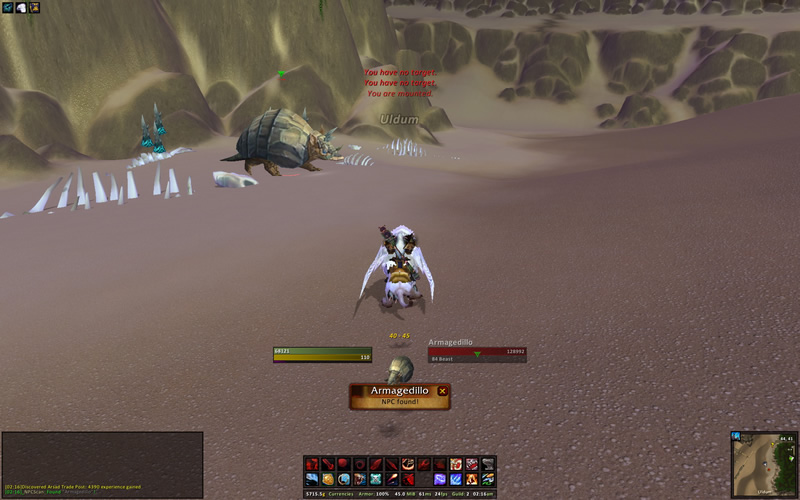
Armagedillo drops a pretty nice rare mace (Armagedillo’s Tail). Although it’s come down in price over the past few months, it still can easily fetch 400G or more. I sold mine for 900G. 😀
Burgy Blackheart was another rare mob that NPCScan tipped me off about. I wasn’t really up to speed on all of the rare non-pet mobs in Cataclysm, so I didn’t even know about this guy. He’s a rare spawn in the Shimmering Expanse of Vashj’ir, who drops an amazing item called Burgy Blackheart’s Handsome Hat. When you put on Burgy’s hat you turn into a ghostly gnome pirate. What’s not cool about that..?!

Had I not been using NPCScan I’d probably have missed the opportunity to jack Burgy for his awesome hat.

If you’re not using NPCScan already, I suggest going and getting it right away. You don’t want to miss out on exciting opportunities like these. 😀
You can download NPCScan from WoWInterface. Also, be sure to get the companion NPCScan Overlay as well. It adds simple highlights to your map so that you can easily pinpoint rare spawn locations.
To install the addons after you’ve downloaded them:
- Navigate to your World of Warcraft directory on your computer.
- On a PC — C:\Program Files\World of Warcraft
- On a Mac — HD:\Applications\World of Warcraft
- Open the Interface\AddOns folder.
- Drag the _NPCScan and _NPCScan.Overlay folders into the Interface\AddOns directory.
- Log into WoW and click on the AddOns tab.
- Check the boxes next to _NPCScan and _NPCScan.Overlay.
- Have fun finding some rare mobs!
Good luck and happy hunting!
Hey what’s up? I was wondering if Loque’Nahak was on the overlay addon? I have been going around the basin forever and he hasn’t pinged and when I click the map just King Krush and Aotona’s locations show up? Just wondering if it was on there, if you could send me an email reply that would be amazing thank you
hew do i get npcscan
where the hell is the interface/addons folder…???
In the: C:/Program Files/World of Warcraft/ folder. -or- Applications/World of Warcraft/ if you’re on a mac. 🙂
Just a heads up regarding npcscan, the camel figurines are no longer able to be targeted. On my druid, I got the warning that it found one, then took me almost 10 minutes to actually *find* it.
Silver Dragon does have clickable portraits. I haven’t tried NPCScan, but I have found Silver Dragon to be extremely useful for finding all kinds of rares, especially rares that I hadn’t even been looking for, including a couple of cool pets that I would never have gone looking for.
Just added NPCscan Overlay this eve which I had no idea existed til reading this and nabbed Sambas. Nice add-on, though not in the mini-map, too busy for my tastes. Like the highlighted areas of Overlay, cuts down on time.
BTW, try putting Burgy’s hat on and then activating the Vykrul Drinking Horn and mount up. Enjoy….you’ll be the envy of everyone with how HUGE your mount is and how small you are. I did it on my Spectral Tiger and it was almost the size of a Mammoth.
SCREW YOU NPC SCAN AND ALWAYS FINDING THE TLPD CORPSE FOR ME…..that’s the ONLY thing I hate about NPC scan. If it’s a dead rare it should put up a middle finger as the portrait.
Gratz on the tame and kills 🙂 Sorry haven’t commented much but I still do pop around regularly to read. Thanks for the great macros, I was actually thinking I should start creating more macros for PVP and there you go reading my mind lol.
Hey Gar, I’ve been using NPC Scan for a while now, and it’s gotten me some great pets! But I’m still a bit confused (and admittedly lazy, since I haven’t bothered to figure it out) about how to clear the cache. Do I just need to remember to go into a folder on my computer and delete a file or something? I figured you’d know.
While you’re logged out, you need to delete the Cache folder. It’s located here: C:\Program Files\World of Warcraft\Cache.
WoW will rebuild the cache file next time you log in, but it’ll be free from all of the cached rare mob info – allowing you to re-find them again! 🙂
I use a target macro along with NPCSCan, because I don’t like having to go through this process all the time. It looks something like the one near the bottom of this post: https://huntsmanslodge.com/8659/ghostcrawler.htm. I spam it when I’m near a spawn area – that way I’ll target the mob whether it’s been cached or not.
That’s a great macro tip, thanks! It’s ok to clear the entire cache folder, then? I wasn’t sure about doing that, but I’ll take your advice.
It’s totally safe. Although, if you want to just clear the creature cache you dan do that too. Just remove the creaturecache.wdb file.
C:\Program Files\World of Warcraft\Cache\WDB\enUS\creaturecache.wdb
If you delete the whole cache file, WoW has to recreate the whole thing on login and can slow your login process. I would recommend just deleting the creaturecache.wdb. I created a batch file that I click as click my WOW shortcut.
In notepad just copy and paste without the quotes (if you did a default install):
“cd\
delete C:\Program Files\World of Warcraft\Cache\WDB\enUS\creaturecache.wdb”
Rename the file with the extension bat instead of txt – (ex: deletecreaturecache.bat)
Put the file on the desktop where you can click it when you are logging in and no problems!
So if you have SilverDragon AND NPCScan running together, do you not really need to clear your cache? EVERY time I enter a zone most (if not all) rares I’m interested in are in the “already cached” message NPCScan gives me. Probably because I was just in Org and people had them as pets >.<
Silver Dragon is nice because it alerts you to vanilla rares too but it does not provide you with the clickable portrait to make targeting easier and it also does not have the overlay with it to assist in finding rares. I am considering having both just so they can cover each other.
NPCScan is a great addon. It’s worth mentioning that if you’ve ever encountered a rare before (including a hunter with a tamed version of Sambas for example), NPCScan will not alert you to future sightings until you remove the creature cache file. Instructions for removing the cache file can be found on the WOW Interface page for NPCScan as well. Another great addon that does this job is called Silver Dragon. It does not use the cache to alert to sightings.
I’m a noob when it comes to addons and such, and while I know the info could be found elsewhere, or perhaps is common knowledge for others, is there any chance you could post some instructions on clearing your NPCScan cache? I have the addon but whenever I enter a zone I see all the rare spawns I’d actually like to look for in the “already cached” message. Doesn’t that mean the scanner wont give alerts for them?